
Plain text gets lost in a busy bio or caption, and a stylish font is the quickest way to stand out. Our stylish font generator turns your words into almost 1,400 copy and paste styles, from bold and script to symbol frames.
You do not need to install anything or create an account. Everything happens in your browser, and the styled text works in apps that have no font menu at all, like Instagram, TikTok, WhatsApp and Discord.
What the Stylish Font Generator Creates
The stylish font generator creates text made of special Unicode characters that look like different fonts. “Stylish Font” becomes 𝐒𝐭𝐲𝐥𝐢𝐬𝐡 𝐅𝐨𝐧𝐭 in bold, 𝒮𝓉𝓎𝓁𝒾𝓈𝒽 ℱℴ𝓃𝓉 in script and ꜱᴛʏʟɪꜱʜ ꜰᴏɴᴛ in small caps.
Because the look is built into the characters, it travels with the text. You can paste the result into a bio, a caption, a game name or a chat, and other people see the same style on their screens.
Using the Stylish Font Generator
We built the tool so you can go from plain text to a pasted style in under a minute. Here is how each part works.
Type Your Text
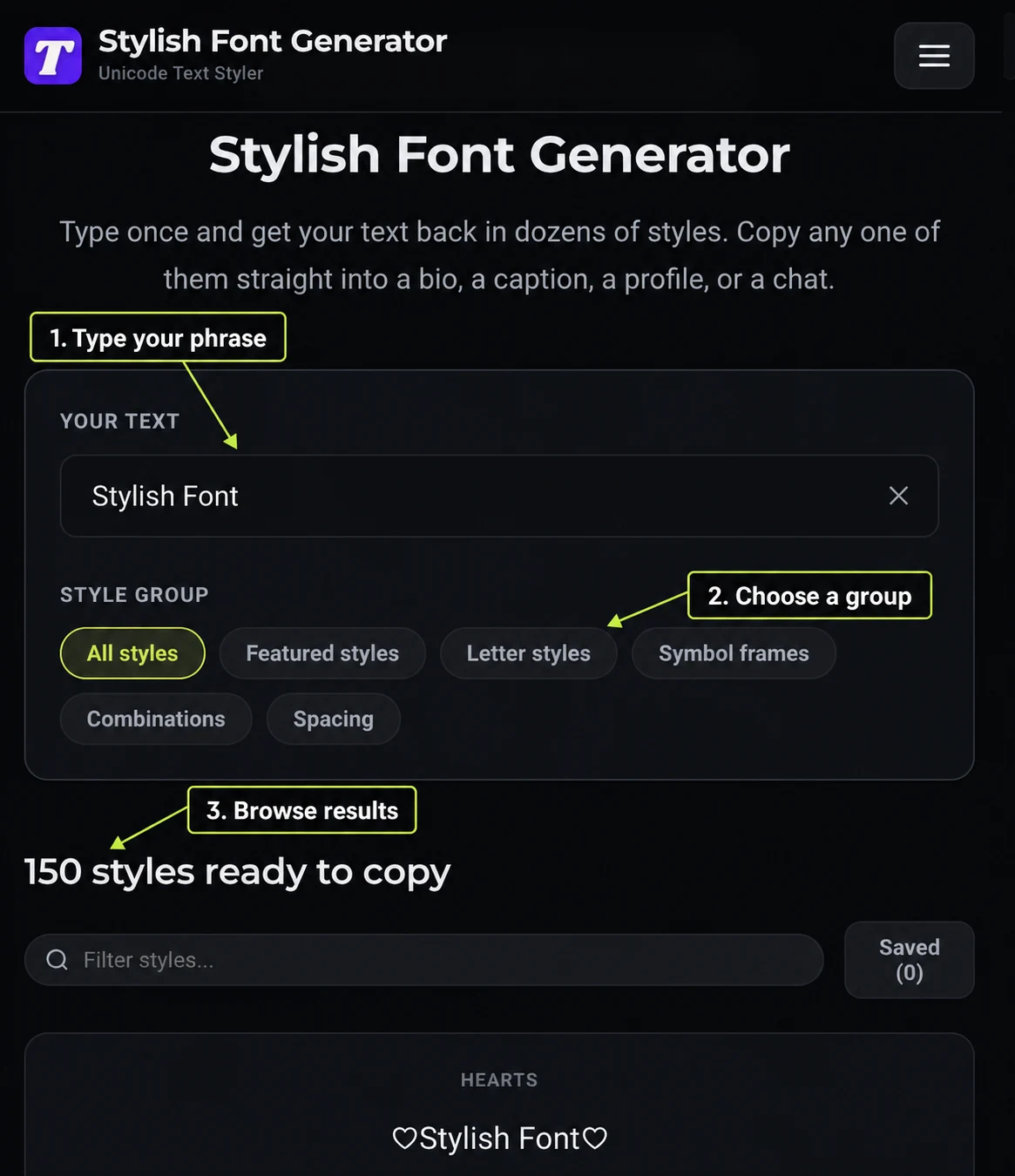
Start in the Your text box at the top. It opens with a sample, and you can replace it with a name, a bio line or anything else up to 120 characters, while the ✕ button clears the box in one tap.
Every card updates while you type, so there is no button to press. For the best comparison, type your words exactly as you plan to post them, with the same capital letters and spaces.
Pick a Style Group
The group buttons under the box sort the styles by type:
- All Styles: Shows the full collection in one long list.
- Featured Styles: Leads with ready-made frames and combinations for short names.
- Letter Styles: Changes the letters themselves, with bold, script, gothic, outline, small caps and effects like strikethrough.
- Symbol Frames: Adds hearts, stars, brackets and other symbols around your plain letters.
- Combinations: Puts a styled alphabet and a frame together for a stronger look.
- Spacing: Spreads letters out or puts symbols between words, which is the lightest touch.
Compare the Results
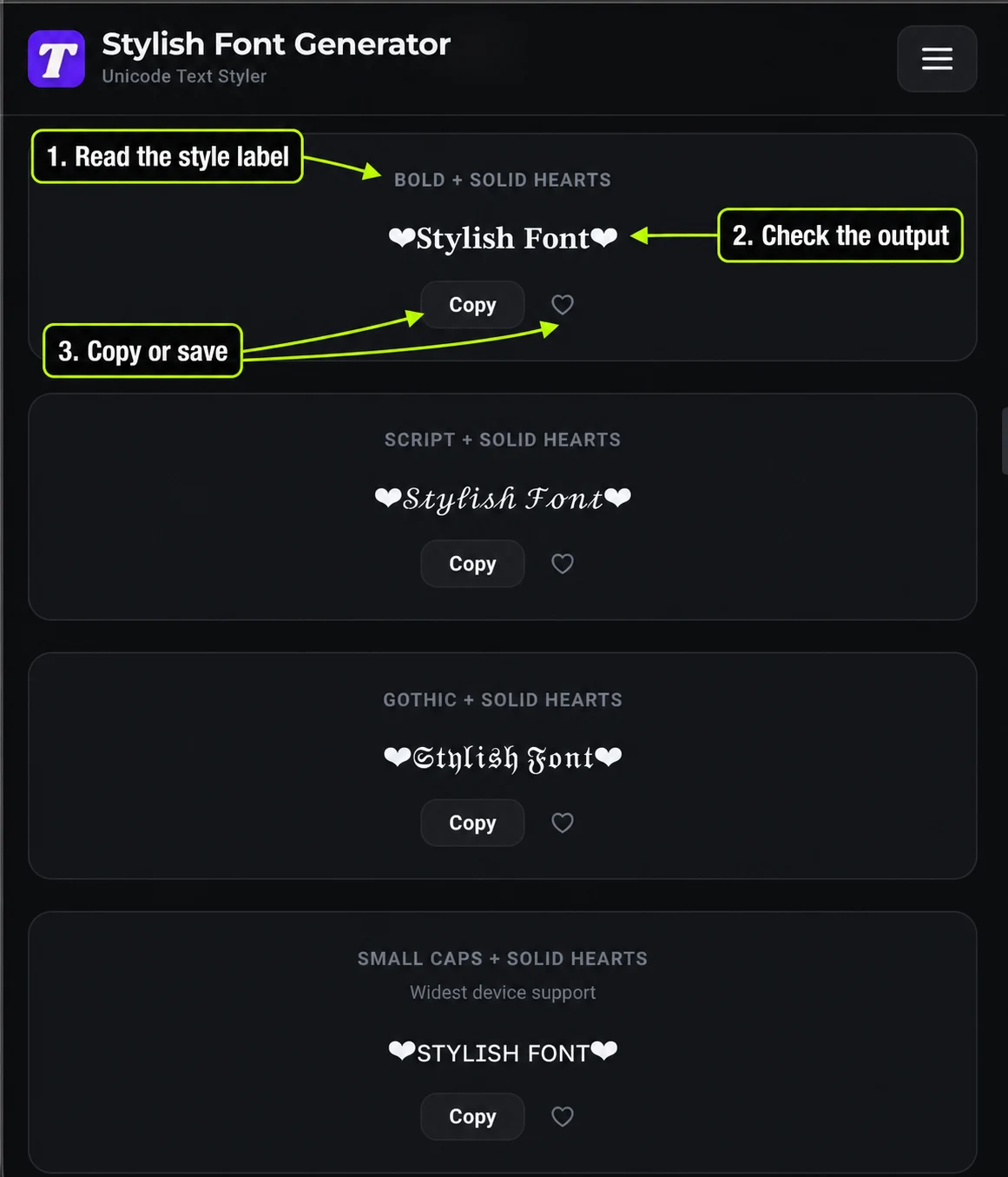
The results start with 24 cards, and Load 24 more styles at the bottom adds the next batch. Each card shows the style name, your styled text and a Copy button, and some cards add a short note, like “Widest device support.”
To find a style fast, type its name into Filter styles…, like “script” or “heart.” The filter searches style names and leaves your text unchanged.
Copy and Save
Tap Copy on any card, and a “Copied to clipboard” message confirms it worked. The heart button saves a style to your Saved list, which stays in your browser on this device, and its Copy all button copies every saved style at once.
How Do You Paste a Stylish Font Into an App?
These steps work on any phone or computer:
- Type Your Words: Enter your text in the Your text box.
- Choose a Style: Browse the groups or use Filter styles… to find one you like.
- Tap Copy: Tap the Copy button on that card.
- Open the App: Go to the app where you want the text, like Instagram or WhatsApp.
- Paste and Save: Paste it into your bio, name, caption or message, then check how it looks before saving.
How Do You Pick a Stylish Font That Stays Readable?
We always start with the job the text needs to do, not the flashiest card. A name people need to read quickly should look clear, while a short decorative line can be bolder.
Small caps, bold and simple frames stay easy to read and work on almost every device. Script, gothic and heavy combinations look great on one or two words, but they get hard to read in a full sentence.
A good habit is to style one part and leave the rest plain. A styled name above a plain bio, or a bold first line in a caption, catches the eye without making people work to read it.
Where Stylish Fonts Work
Stylish fonts work best in short, personal spaces. Bios, display names, captions, comments, chats, video titles and Discord messages all accept them.
Usernames and handles are stricter. They are often limited to plain letters, numbers and a few symbols, and games can have their own rules for player names and clan tags.
Each of our tool pages covers one platform or game, with its real limits. For example, Fonts for Instagram covers the 150 character bio, and the Free Fire Stylish Name Generator covers its short nickname box.
Why Can a Style Look Right Here but Fail Elsewhere?
Every device draws Unicode characters with its own fonts, and older phones do not have every character. When a style turns into boxes or question marks, that device has no drawing for those characters.
Effects like Strikethrough and Underline add a separate mark to each letter. That makes the text count as longer than it looks, which matters in fields with a tight limit.
Search and screen readers also work best with plain letters. A styled word may not match a normal search, and some screen readers read styled letters by long technical names.
What to Keep in Plain Letters
Some text needs to stay plain to work. Keep these in normal letters every time:
- Usernames and Handles: Most platforms refuse styled letters there anyway.
- Contact Details: Email addresses, phone numbers and links need to work when people tap or copy them.
- Search Words: Your niche, location and keywords need plain letters to show up in search.
- Hashtags: A styled hashtag does not link to the tag page.
Which Style Group Fits Which Job?
Each style group solves a different problem, and picking the right one first saves a lot of scrolling. Letter styles are best when you want the words themselves to look different, like a bold caption opener or a script name.
Symbol frames are best when people still need to read, search or type your words, like a display name or a group name. Combinations suit short headings and gaming names, while Spacing works for dividers and short aesthetic lines.
We usually start with frames for names and letter styles for captions. If neither feels right, the Featured styles group mixes both in ready-made looks.
Styling Text on a Phone Versus a Computer
On a phone, the Copy button is the easiest way to grab a style, because selecting styled characters by hand often misses a mark. After copying, a long press in the other app’s text box brings up the Paste option.
On a computer, the keyboard shortcuts work just as well, with Ctrl and V on Windows or Command and V on a Mac. Computers also make it easier to compare styles side by side, since more cards fit on the screen at once.
Your Text Stays in Your Browser
Everything on this page runs in your browser, so the words you type are never sent to us or anyone else. That matters when you style a real name, a business name or a private message.
The Saved list works the same way. It is stored in your browser on this device, which means your saved styles stay private and disappear if you clear your browser data.
Why Each App Gets Its Own Page
The same styled text can work in one field and fail in the next. An Instagram bio, a Facebook name and a Free Fire nickname all have different rules about length and characters.
We built a page for each app and game, grouped into four hubs: Social Media Fonts, Fancy Text Tools, Stylish Names and Bios and Gaming Name Styles. Each page covers the real limits for that place, so you know a style will fit before you paste it.
Which Tool Should You Use Next?
For longer captions and posts, the Stylish Text Generator puts the easiest to read styles first. Gamers can start with the Fancy Gaming Name Generator, and Roblox players will find cute trade post styles on the Adopt Me Font Generator.
The All Tools page lists every generator by platform and game. If you still need the name itself, our sister site’s nickname generator helps you find one first, and then you can style it here.